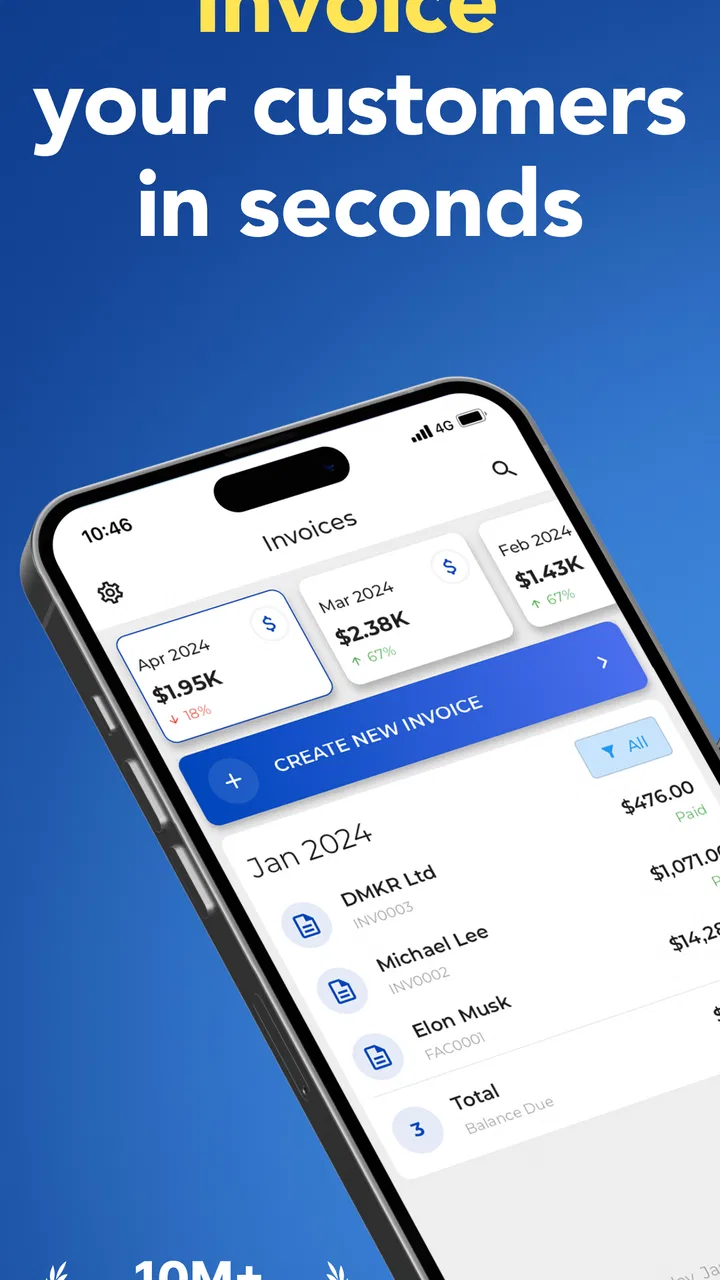
Invoice Maker - Invoice Fly
- 4.7
- Rating
- 1.00M
- Installs
- Free
- Price

 Analysis by App-foxy
When I need to create an invoice away from a desk, I want something that removes decisions rather than adding another complicated business system to learn. Invoice Maker - Invoice Fly is aimed at that exact moment: making invoices, bills, receipts, and estimates from a phone. I found it most useful as a lightweight business companion for freelancers, tradespeople, consultants, and small operators who need to turn a completed job into a professional-looking document before the day gets away from them.
It is a free business app from Labhouse Mobile, with optional in-app purchases ranging from $5.99 to $299.99 per item. That pricing detail matters because the basic download is easy to try, but anyone planning to depend on it for regular invoicing should pay attention to which tools are available without payment and which workflow elements may lead toward an upgrade. The app is rated for Everyone, runs on Android 7.0 or later, and its current version is 2.18.0.
How Invoice Fly feels during everyday work
The first thing I noticed is that the app’s purpose is clear. It does not try to become a full accounting office on your phone. Instead, it focuses on preparing documents that you can use while travelling between clients, standing in a workshop, or finishing a job at someone’s home. That narrow focus helps the experience feel less intimidating than a broad accounting platform packed with ledgers, tax reports, payroll tools, and business dashboards.
You May Also Like

 Blood Strike: 2.5 Anniversary
Blood Strike’s Loadouts Turn Every Drop Into a Tactical Gamble
A close look at Blood Strike’s custom loadouts: how fast access to signature weapons reshapes its battle royale rhythm, rewards preparation, and narrows the gap between fights.

 Pandora - Music & Podcasts
Pandora’s Music Is Easy to Start, but Harder to Recover
Pandora’s strength is its low-effort path from a seed to a station. Its weak spot is how much confidence it asks you to place in connection, setup, and quiet recovery.

 8 Ball Pool
 Is Built on Rivalries, Rematches, and Routine
A close look at the rivalries, rematches, shared routines, and unanswered safety questions that turn a quick pool match into a persistent mobile community.

 Samsung Music
’s Quiet Strength Is Playing What You Already Own
Its reach comes less from spectacle than from dependable access to a personal library. That simplicity is both the app’s strongest retention engine and its ceiling.

 AccuWeather: Weather Radar
AccuWeather Review: A Quick, Clear Forecast for Everyday Decisions
For everyday plans, the best forecast is the one you can understand quickly. AccuWeather makes rain timing, radar, and local conditions easy to act on, with a few trade-offs.

 Hill Climb Racing
Why Hill Climb Racing Still Turns Crashes Into One More Run
A tiny car, a bumpy hill and one more upgrade: Hill Climb Racing keeps resurfacing because its simple chaos makes every near-miss feel personal.
More From Our News Desk



For a sole trader, that simplicity can be more valuable than a long list of advanced modules. You can think about the job, the customer, the items or services involved, and the amount due instead of navigating a large desktop-style system. I would particularly recommend it to someone who has been writing invoices manually or copying old documents because the app offers a more repeatable way to handle the same task.
The store summary mentions invoices, bills, receipts, and estimates, and that combination gives the app a practical place in the sales process. An estimate can be prepared before work begins, an invoice can follow after completion, and a receipt can help close the loop after payment. Even when the business is small, separating those stages makes conversations with customers clearer.
My main advice is to decide your document routine before entering anything. Keep the wording of recurring services consistent, agree on how you name customers, and use the same approach to descriptions each time. The app can make document creation quicker, but it cannot repair a disorganized pricing habit. A few minutes spent creating a clean structure early on can save repeated editing later.
Speed expectations on a phone
Invoice Fly feels designed for short sessions rather than long administrative marathons. That is important because mobile invoicing is usually needed at inconvenient times. A plumber may finish a repair and want to prepare the charge before driving away. A photographer may need to send an estimate between appointments. A tutor may want to record a completed lesson while the details are still fresh.
In those situations, I would expect the app to feel more direct than opening a spreadsheet, finding the right template, adjusting formulas, and exporting a document. The advantage is not necessarily that every tap is instant; it is that the workflow is centered on the document you are trying to produce. Less setup usually means less mental friction.
There is also a useful distinction between creating a document and managing a business. Invoice Fly is well suited to the first task. If you only issue a modest number of invoices, the app should feel appropriately sized. If you are trying to manage a large customer history, reconcile every payment, track expenses, and produce detailed financial reports, a dedicated accounting service will probably provide a better long-term structure.
For the best experience, I would prepare information before starting a document. Have the customer’s name, service description, quantity, and agreed price ready. On a small screen, repeatedly switching between messages, notes, and the invoice form is where the process can slow down. The app can shorten the final step, but good preparation still determines how fast the whole job feels.
What happens when use becomes heavier
The app becomes more interesting when it is used repeatedly across a working week. A single invoice is easy to judge, but a useful mobile tool must also remain manageable when several customers, estimates, and receipts begin to accumulate. This is where I would treat Invoice Fly as a focused document maker rather than assume it replaces every part of a business system.
A sensible workflow is to create a consistent customer record, use recognizable descriptions, and review each document before sending it. That final check is especially important on a phone, where a small typing mistake can be easy to overlook. I would verify the customer, the service wording, the amount, and the document type every time. An estimate accidentally presented as an invoice can create unnecessary confusion.
Heavy use also exposes a trade-off between convenience and control. A mobile app is excellent when you need to act immediately, but a larger screen remains better for reviewing many lines, comparing several documents, or cleaning up a long customer list. I would use Invoice Fly for creating and checking individual documents, then reserve more detailed financial organization for a desktop tool if the business grows.
Another practical point is consistency across recurring work. If you offer the same service to different customers, avoid rewriting the description from memory every time. A small variation may not matter for a simple job, but inconsistent wording makes later review harder. Treat the app as part of a process: establish your standard descriptions, then use the phone to apply them quickly.
The strongest performance benefit is workflow speed, not unlimited business scale. That distinction makes the app easier to judge fairly. It can reduce the time between finishing work and preparing a document, but it should not be mistaken for a complete replacement for accounting software in a growing company.
Reliability and recovering from interruptions
Reliability in an invoicing app is about more than whether the screen opens. It is also about whether you can recover gracefully after a phone call, a dead battery, a distracted customer conversation, or an accidental exit. This is one reason I would avoid rushing through a document simply because the app is convenient. Before treating an invoice as finished, review it and make sure the information is saved or ready for the next step.
Mobile work is naturally interruptible. You may begin an estimate in a client’s driveway, answer a call, and return several minutes later. You may also move between poor and strong connectivity during the day. I would therefore build a habit of completing one document at a time and checking its final state before starting another. That habit is useful regardless of the app, but it is particularly important when the phone is being used as a work tool rather than a quiet office computer.
I also recommend keeping your own basic record of important transactions. That does not mean the app is unsuitable; it means invoices are business documents, and relying on a single mobile workflow without any backup routine is risky. Save or retain copies in the way that fits your business procedures, especially for documents connected to larger jobs or disputed payments.
When an interruption occurs, the safest recovery approach is not to assume that a half-completed document is ready. Reopen the relevant work, inspect the customer and amount, and continue only after confirming what has already been entered. This may sound cautious, but it prevents the more expensive mistake of sending an incomplete or duplicated document.
The app’s broad audience rating also makes it approachable for people who are not comfortable with business software. That accessibility is a strength, although it means experienced users may find the workflow less deep than a professional accounting package. The right choice depends on whether your priority is getting a clean document out quickly or maintaining a detailed financial system.
Device limits and the role of the phone
Invoice Fly supports Android 7.0 and newer, so it is available to people using older Android devices as well as recent phones. That broad compatibility is helpful for small businesses that do not replace hardware frequently. Still, compatibility does not make every phone equally comfortable. A small display, an aging battery, limited storage, or a slow keyboard can make data entry feel more tiring even when the app itself is suitable.
For occasional invoices, an older supported phone may be perfectly adequate. For frequent use, I would prefer a device with a responsive keyboard and enough screen space to review the entire document without constant scrolling. The difference is not just comfort. Better visibility makes it easier to catch an incorrect digit, a truncated description, or a customer detail entered in the wrong place.
Resource demands are best judged by the type of work rather than by expecting the app to behave like a full office suite. Creating individual business documents is a lighter task than maintaining large databases or producing extensive reports. I would still avoid filling the phone with unnecessary background tasks while working on an important invoice, particularly on older hardware. Closing unrelated apps and keeping the device charged is simple preparation that improves any mobile business session.
People using iPhones should check the relevant version of the app for their device before committing to a workflow, while Android users can use the stated minimum operating-system requirement as a starting point. In either case, the practical question is whether the phone is comfortable for repeated typing and reviewing. A supported device can run an app, but comfort determines whether you will actually keep using it.
There is also a privacy and organization consideration in using a personal phone for business documents. Keep customer information organized, use a device lock, and avoid mixing important work with a cluttered personal notes system. These are not special promises about the app; they are sensible habits when business records live on a mobile device.
Who will benefit most from it
I see Invoice Fly as a strong match for freelancers, independent contractors, repair professionals, home-service providers, and small sellers who need polished documents without building an accounting department. It is also useful for someone testing a new service and wanting to issue estimates before investing in a larger software subscription.
A realistic example would be a self-employed electrician completing a small installation. Before leaving, they can prepare an invoice while the materials and labour details are still clear. If the customer asks for a different job later, an estimate can be prepared as a separate step instead of relying on a handwritten figure or an informal message. Once payment is made, a receipt helps create a clearer record for both sides.
That scenario shows why the app’s mobile focus matters. The value is not only document formatting; it is the ability to complete an administrative task at the point where the work happens. For people who regularly postpone invoicing until the end of the week, that immediacy could make cash-flow habits more disciplined.
I would be more cautious about recommending it as the main system for a company with several employees, complicated tax requirements, extensive inventory, or a high volume of transactions. Those businesses usually need permissions, reporting, reconciliation, and deeper records. A spreadsheet may offer more flexibility for a technically confident user, while dedicated accounting software will generally be better for structured financial management.
How it compares with common alternatives
The most obvious alternative is a spreadsheet template. Spreadsheets offer control and can be adapted to unusual pricing models, but they also demand more setup and make it easier to break formulas or create inconsistent documents. Invoice Fly is more appealing when the goal is a repeatable mobile workflow rather than a custom financial model.
Another alternative is a desktop invoicing or accounting platform. Those tools tend to win when you need extensive history, reports, payment reconciliation, or collaboration. Their weakness is the extra complexity involved in producing one quick document from a phone. Invoice Fly occupies the space between a blank template and a full accounting system.
There are also general note-taking apps and word processors. They may be enough for an occasional informal bill, but they do not naturally guide you through the different document types that a small business may use. The presence of invoices, bills, receipts, and estimates in one focused app gives Invoice Fly a clearer purpose than simply typing a document from scratch.
The trade-off is that focused simplicity can become limiting. If you want to redesign every part of a document, build elaborate formulas, or connect invoicing to a larger operational system, another option may be the better investment. I would choose Invoice Fly when speed and portability matter more than deep customization.
Cost, maturity, and practical expectations
The app is free to install, which makes trying the basic workflow straightforward. Optional purchases from $5.99 to $299.99 per item create a wide range, so I would not assume that every useful capability is included at no cost. Before building your entire business around it, inspect the upgrade screens carefully and decide whether the available plan matches how often you invoice.
Its release date was December 27, 2022, and the current version is 2.18.0. I read that as a product with time to develop beyond its initial launch, while still encouraging users to keep the app updated. Updates can matter for stability, compatibility, and the general feel of a business tool that is used repeatedly.
The app has reached over 500 thousand installs, with an average rating of 4.7 from around 33 thousand ratings and about 2.1 thousand written reviews. Those figures suggest that many people find the concept useful, but they should not replace your own test. A freelancer issuing a few simple invoices has different needs from a company managing a large customer operation.
My testing mindset would be practical: create a sample estimate, turn your usual service into a sample invoice, review a receipt, and see how comfortable the editing process feels on your phone. Try this before entering real customer information. Pay attention to how quickly you can correct an error, how clearly you can distinguish document types, and whether the free experience covers your normal routine.
My performance verdict
Invoice Fly succeeds when I treat it as a fast, mobile-first way to prepare business documents. Its likely performance advantage is not a dramatic technical benchmark; it is the reduced effort between finishing a job and recording what happened. That makes it a sensible choice for independent workers who value immediacy and do not need a complete accounting suite.
Its limitations are equally clear. A phone is not the ideal place to organize a complex business, and a focused invoice app should not be judged as if it were enterprise finance software. Older devices, long documents, repeated corrections, and heavy transaction histories can make the experience less comfortable. The optional purchase range also means you should check the cost of the tools you actually need rather than assuming the free installation is the whole product.
For a friend who regularly delays invoices, I would recommend giving it a careful trial. Start with a sample customer, establish consistent service descriptions, and test the full path from estimate to invoice to receipt. If that process feels natural and the available features fit your work, the app can become a useful daily shortcut.
For a larger company or anyone who needs detailed financial oversight, I would choose dedicated accounting software instead. For everyone in between, especially a solo professional who wants to work from the job site, this is a focused and approachable option. My final view is that Invoice Fly is best when you need dependable document creation on the move, not when you expect one mobile app to run the entire business.
FAQs for Invoice Maker - Invoice Fly
01What features does Invoice Maker - Invoice Fly offer for small businesses?
Invoice Maker - Invoice Fly is equipped with features tailored to small businesses, including customizable invoice templates, expense tracking, and real-time reporting. Users can also benefit from automated payment reminders and multi-currency support, making it ideal for businesses with international clients. These features streamline financial management and improve cash flow efficiency.
02Is Invoice Maker - Invoice Fly suitable for freelancers?
Absolutely. Invoice Maker - Invoice Fly is designed with freelancers in mind, offering the ability to quickly create professional invoices and send them directly to clients. The app also tracks billable hours and expenses, ensuring freelancers can efficiently manage their finances and focus more on their creative work.
03Can I use Invoice Maker - Invoice Fly without an internet connection?
Yes, Invoice Maker - Invoice Fly offers offline functionality. Users can create and edit invoices without an internet connection, and all changes will sync automatically once the device is back online. This feature ensures uninterrupted workflow, even in areas with limited connectivity.
04How secure is my financial data on Invoice Maker - Invoice Fly?
Invoice Maker - Invoice Fly prioritizes user security, employing encryption protocols to protect sensitive financial data. The app also offers secure cloud storage for backups, ensuring users’ information remains safe and accessible. Regular updates and security patches further enhance data protection.
05Are there any subscription fees for using Invoice Maker - Invoice Fly?
Invoice Maker - Invoice Fly offers a free version with basic features, ideal for individual users or small operations. For access to advanced features such as unlimited invoices and premium templates, users can opt for a subscription plan, which is competitively priced to suit various business needs.
Pros
- User-friendly interface for quick invoicing.
- Customizable templates enhance professionalism.
- Supports multiple currencies for global use.
- Integrates with popular payment platforms.
- Real-time notifications for invoice status.
Cons
- Limited free version features.
- Occasional sync issues with cloud services.
- No offline mode available.
- Customer support can be slow at times.
- Advanced features require a subscription.

Invoice Maker - Invoice Fly
Gallery